On Linux a job's memory can be capped with ulimit -v, systemd-run -p MemoryMax= or a cgroup, and a job that grows too big fails on its own instead of taking the machine down. macOS has no systemd and no cgroups, and ulimit refuses. This is macOS 26.5.2:
$ /bin/bash -c 'ulimit -v 1048576'
/bin/bash: line 0: ulimit: virtual memory: cannot modify limit: Invalid argument
$ /bin/bash -c 'ulimit -m 1048576'
/bin/bash: line 0: ulimit: max memory size: cannot modify limit: Invalid argument
resource.setrlimit(resource.RLIMIT_DATA, ...) in Python raises ValueError, and in the shell where ulimit -m had failed, a script went on to allocate and touch 3 GiB. What macOS does instead is compress memory and write it to swap. A model that doesn't fit doesn't fail: it slows down, and so does everything else on the Mac.
So the questions worth asking change: is there room before a job starts, and is swap growing while it runs?
Check swap while a job runs
sysctl vm.swapusage             # compare "used" before and after a run
sysctl kern.memorystatus_level  # system-wide free memory, in percent
The process footprint, the number Activity Monitor shows, doesn't count pages that are already in swap. In one run of Qwen-Image-2.1 with diffusers' model CPU offload on my 48 GB M5 Pro, the footprint never went above 18.5 GB while swap grew by 9.6 GB. A chart of the footprint alone would have called that run a fit.
Stop a job before it swaps
stageload, a small library I wrote for loading models one stage at a time, ships a guard for this (pip install stageload):
stageload guard --wait-free 40 --swap-budget 8G -- python generate.pyIt waits until kern.memorystatus_level is at least 40 %, then starts the command. If swap grows more than 8 GB over what was in use at the start, or free memory stays under 10 % for two samples, it sends SIGTERM to the command's process group and, five seconds later, SIGKILL to whatever is left. It needs no root, and the command and its process group are the only processes it ever stops. Exit code 3 means the guard stopped the command and 4 that it never found room to start it; otherwise you get the command's own exit code.
That is how the eager Qwen-Image run ended: it got through all 20 steps, the VAE decode took the footprint to 43.6 GB, swap grew by 8 GB, and the guard stopped it before the Mac stalled.
Two heavy jobs at once
A guard decides alone. Two guards that find room at the same moment both start their jobs, and each job was sized for a Mac with nothing else running. On 5 October one of my runs started in the gap between two video jobs of another script, and the next video job took swap past its budget within 20 seconds.
stageload run puts the jobs in one queue for the machine. It takes the guard's flags. Here two jobs hold 3 and 2 GiB, started from two terminals:
stageload run --who images -- python3 alloc.py 3 10    # holds 3 GiB for 10 s
stageload run --who upscale -- python3 alloc.py 2 4    # holds 2 GiB for 4 s
$ stageload queue
ram 0 running images pid 32488 since 2026-10-12T14:08:56+00:00 python3 alloc.py 3 10
ram 1 waiting upscale pid 32499 since 2026-10-12T14:08:58+00:00 python3 alloc.py 2 4The second job starts when the first one ends, and then the guard's checks run as usual:
14:08:58Z queue: waiting in ram (1 ahead: images)
14:09:08Z queue: start in ram after 10 s, swap 6.0 GB, stop above 14.0 GB or under 10% available twice
$ stageload queue --history 2
done ram exit 0 images waited 0 s, ran 10 s, peak 3.0 GB python3 alloc.py 3 10
done ram exit 0 upscale waited 10 s, ran 4 s, peak 2.0 GB python3 alloc.py 2 4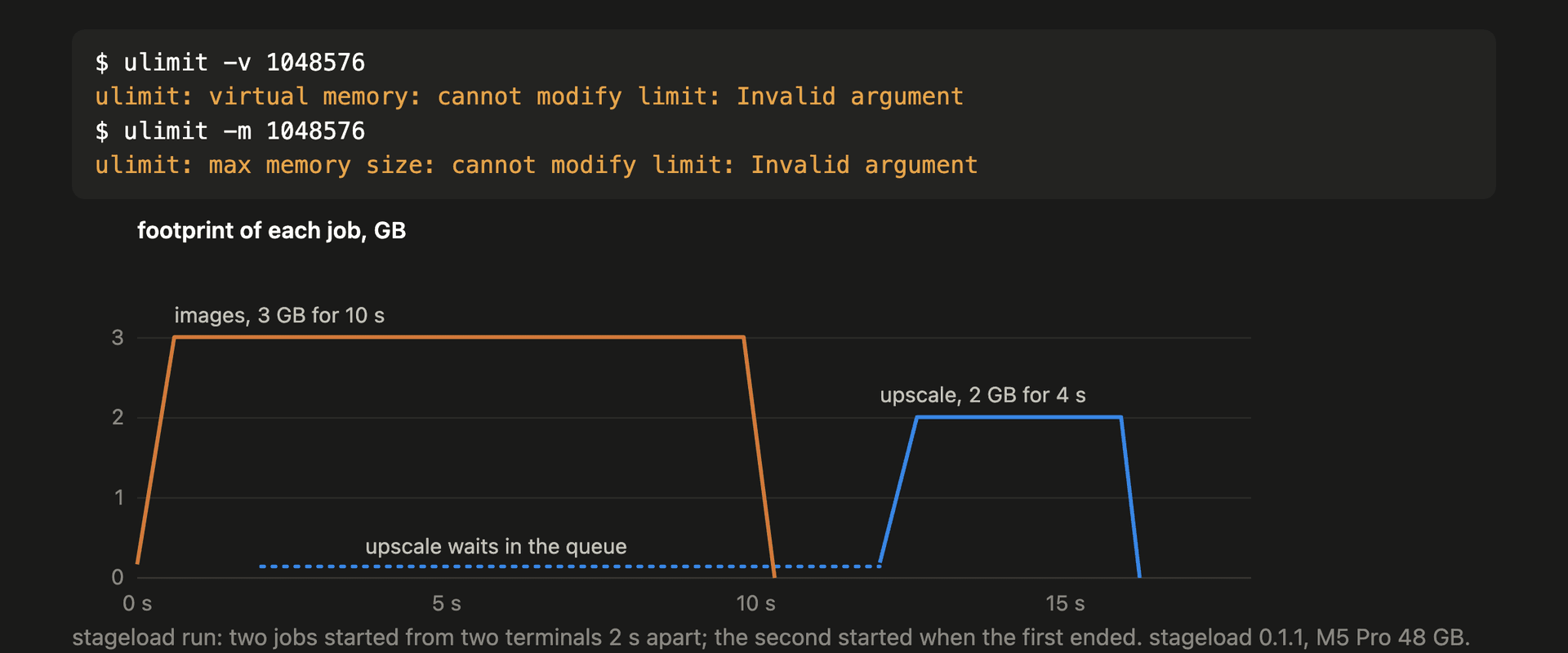
Details that mattered on a shared Mac:
- Jobs join a lane,
ramby default. Lanes don't wait for each other, so a job that waits on a remote API quota can go in a lane of its own (--lane api --wait-free 0) and not hold up the ones that need memory. - Turns are fair between owners. The owner who started least recently goes next, so a script that queues twenty jobs takes turns with the others instead of holding the lane. The owner is
--owner, or the part of--whobefore its first dash. - Each run writes a memory trace of the command and every process under it, and one line to
~/.stageload/history.jsonlwith the wait, the run time, the peak footprint and swap. - Engines started outside the queue go in
~/.stageload/busy.txt, one pattern per line. Every run in theramlane waits until none of them has been seen for 20 seconds.
Limits
- The guard and the meter read macOS counters (
libproc,sysctl), so they only run on a Mac. - The guard stops a job; it doesn't make the job smaller. On the model side, loading one model per stage is what took Qwen-Image-2.1 from 43.6 GB to 19.0 GB on the same Mac: How to run Qwen-Image-2.1 on a 48 GB Mac without swap.
- For a safety net across the whole machine, macos-oom-guard runs as root and kills the largest process before the kernel panics. The two can run together.